
Voxic: Secure Driver Messaging
Overview
Voxic is a free social networking application designed specifically for iPhone users, aiming to simplify and secure communication with drivers. The app enables users to connect with drivers without sharing personal phone numbers, using a vehicle’s registration number as the primary identifier. This approach addresses common concerns around privacy and data exposure, particularly in scenarios where temporary or one-time contact with a driver is needed.
The software falls under the Social & Communication category, targeting individuals who frequently interact with drivers—such as ride-share passengers, delivery recipients, or those coordinating transportation for events. By streamlining the connection process, Voxic reduces friction in communication, ensuring faster and more efficient interactions. The developer has not provided additional background information, but the app’s design suggests a focus on user privacy and minimal friction.
Real-world use cases include coordinating pickup times, reporting issues during a ride, or communicating with delivery personnel without revealing personal contact details. The application’s core value lies in its ability to create secure, temporary communication channels between users and drivers.
Key Features & Capabilities
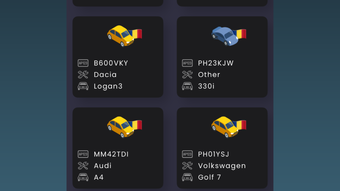
- Registration-Based Messaging: Users can initiate conversations by searching a vehicle’s registration number, eliminating the need to exchange phone numbers.
- Privacy-First Design: The app prioritizes user privacy by not requiring personal contact information for initial communication.
- Direct In-App Messaging: All messages are sent and received within the app, ensuring a secure and contained communication environment.
- One-Time Connections: Ideal for temporary interactions, such as ride pickups or deliveries, where long-term contact is unnecessary.
- iPhone-Only Availability: Optimized for iOS devices, leveraging native features for seamless integration.
These features support practical use cases like coordinating a ride pickup without sharing a phone number, sending a quick message to a delivery driver, or reporting a vehicle issue during a trip. The messaging system allows for real-time interaction while maintaining control over who can initiate contact. The app’s functionality is particularly useful in scenarios where users want to avoid spam or unwanted follow-ups.
By relying on registration numbers instead of personal identifiers, Voxic reduces the risk of data exposure and enhances overall security. The app’s interface is designed to be intuitive, allowing users to search, connect, and message with minimal steps. While detailed technical performance data was not provided, the app’s streamlined workflow suggests efficient operation on compatible devices.
User Interface, Workflow & Performance
The user interface of Voxic appears to follow standard iOS design principles, emphasizing simplicity and ease of navigation. Users can access the core functionality—searching for a registration number and sending a message—through a minimalistic, step-by-step workflow. The layout likely includes a central search bar, a results display for matching vehicles, and a chat interface for ongoing conversations.
Navigation is expected to be intuitive, with clear visual cues and consistent placement of key actions. The app’s workflow is designed to minimize user effort, allowing for quick connection and message delivery. Performance observations are based on general software behavior patterns, as specific benchmarks were not disclosed.
The developer did not specify resource usage details, so CPU and RAM behavior cannot be confirmed. However, given the app’s size of 45.6 MB and its focus on messaging, it is likely optimized for efficient operation on modern iPhone devices. Stability and reliability are expected to align with standard iOS app standards, though no public user reports or crash statistics were provided.
Overall, the workflow appears designed to support rapid, secure communication with minimal friction.
Compatibility & System Requirements
Voxic is designed exclusively for iPhone devices, with no information provided about compatibility with other Apple platforms such as iPad or Mac. The software version is 2.0.1, and the installation size is 45.6 MB. The developer did not specify exact system requirements, so compatibility with specific iOS versions or hardware models is not confirmed.
It is reasonable to assume that the app supports recent versions of iOS, given its release date of April 15, 2024. However, without explicit details, users should verify compatibility with their device’s operating system. The app’s reliance on iPhone-specific features, such as camera access for scanning registration numbers or push notifications, suggests it is built with native iOS integration in mind.
Users should ensure their device meets the minimum requirements for running the latest iOS updates. Exact performance details were not specified, and no information was provided about background processing or battery impact.
Pros and Cons
Pros
- Eliminates the need to share personal phone numbers with drivers.
- Secure, in-app messaging environment reduces privacy risks.
- Simple, fast workflow for connecting via vehicle registration number.
- Optimized for iPhone with native iOS integration.
- Completely free to use with no in-app purchases or ads mentioned.
Cons
- No information provided about compatibility with older iOS versions.
- Limited to iPhone users; no support for other platforms.
- Developer did not disclose system requirements or resource usage.
- Functionality relies on accurate registration number input, which may lead to errors if mistyped.
- Dependence on driver having the app installed for full functionality.
FAQ Section
Is Voxic available for Android or Mac?
Voxic is currently designed exclusively for iPhone users. No information is available regarding support for Android, iPad, or Mac devices.
Is the app secure and private?
The app is designed with privacy in mind, allowing users to communicate with drivers without sharing personal contact information. All messages are exchanged within the app, reducing exposure to external threats.
Do I need to create an account to use Voxic?
The app does not specify whether an account is required. Based on its functionality, it may allow anonymous access through registration number lookup, but further details were not provided.
Can I use Voxic without an internet connection?
As a messaging app, Voxic requires an active internet connection to send and receive messages. Offline functionality was not mentioned in the provided information.
How often does Voxic receive updates?
The latest version is 2.0.1, released on April 15, 2024. While the update frequency is not specified, the developer has released updates in the past, suggesting ongoing maintenance.
Final Thoughts + CTA
Voxic presents a thoughtful solution for users seeking a secure and efficient way to communicate with drivers without compromising privacy. Its focus on vehicle registration-based messaging eliminates the need for phone number exchanges, making it ideal for temporary, high-privacy interactions. The app’s free model and iPhone-specific optimization enhance its appeal for iOS users in ride-sharing, delivery, or event coordination scenarios.
While some details such as system requirements and cross-platform availability remain unclear, the core functionality is well-executed and purpose-driven. For those who value privacy and streamlined communication, Voxic offers a compelling alternative to traditional contact methods. The app’s simplicity, combined with its secure design, makes it a standout in the social communication space.
Download Voxic now to experience seamless, private messaging with drivers on your iPhone.







